Your AI.
Always.
By Your Side.
Run multiple AI agents right inside the app on your PC, and direct or check on them from your phone when you're away. One workspace for your AI, from PC or phone.
Join the Discord community OpenClaw
 Hermes
 Codex
Codex Claude Code
 OpenCodeand more…
SEE IT IN ACTION
The real thing, as is.
Chats and terminals side by side for each task, and you can see at a glance which agent is working.
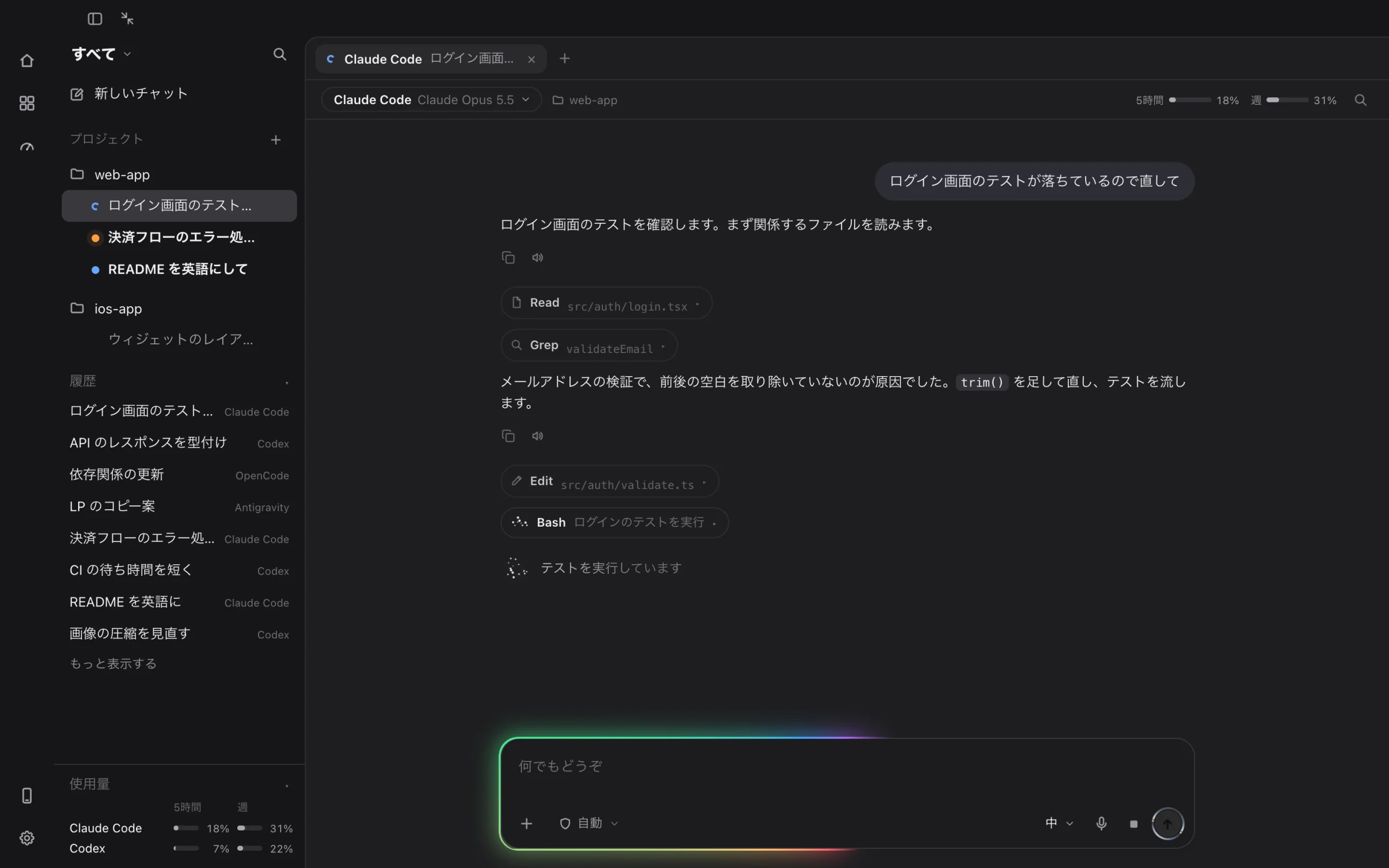
COMMAND CENTER
Every agent, one command center.
Manage Claude Code, Codex, OpenCode, Antigravity and more, grouped by task. Badges show what's working, what needs you, and what's done — and notifications and your phone keep you in the loop when you step away.
View Features→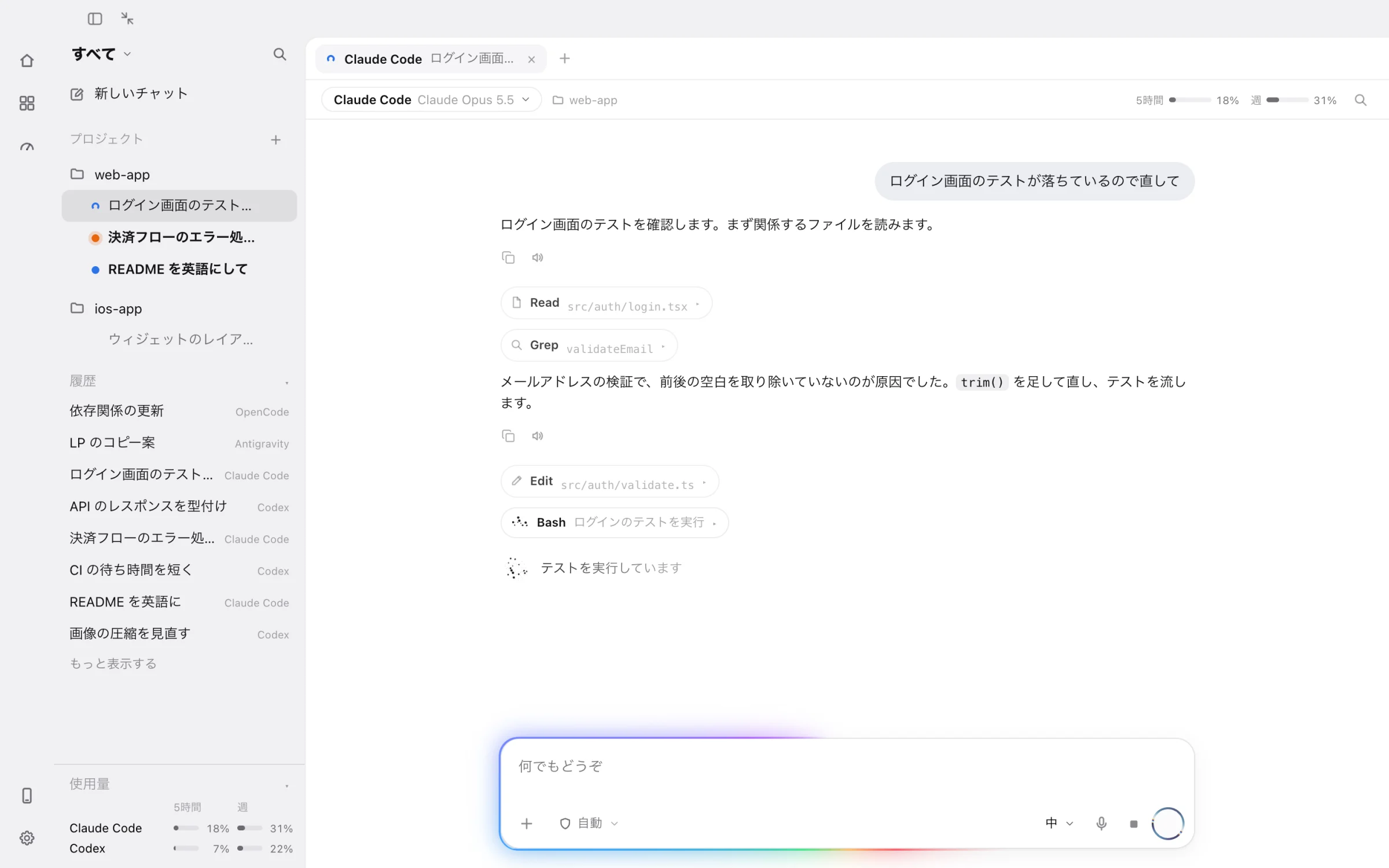
WORK ON YOUR PC
Work right on your PC.
Not just a remote: chats and terminals run right inside the desktop app.
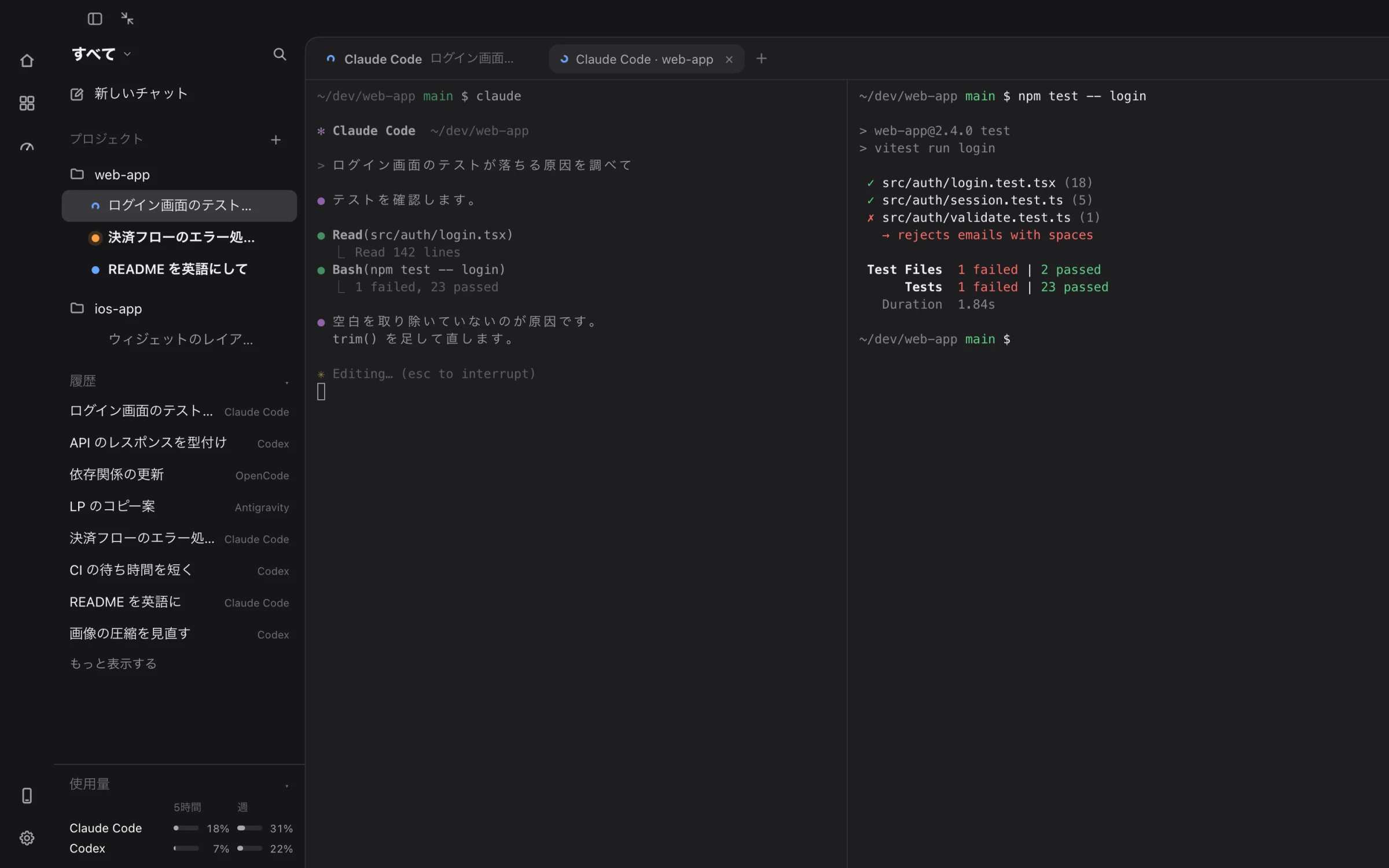
Terminal inside the app
Launch agents in a terminal and split it left/right or top/bottom. Run tests while the agent fixes them, on one screen.
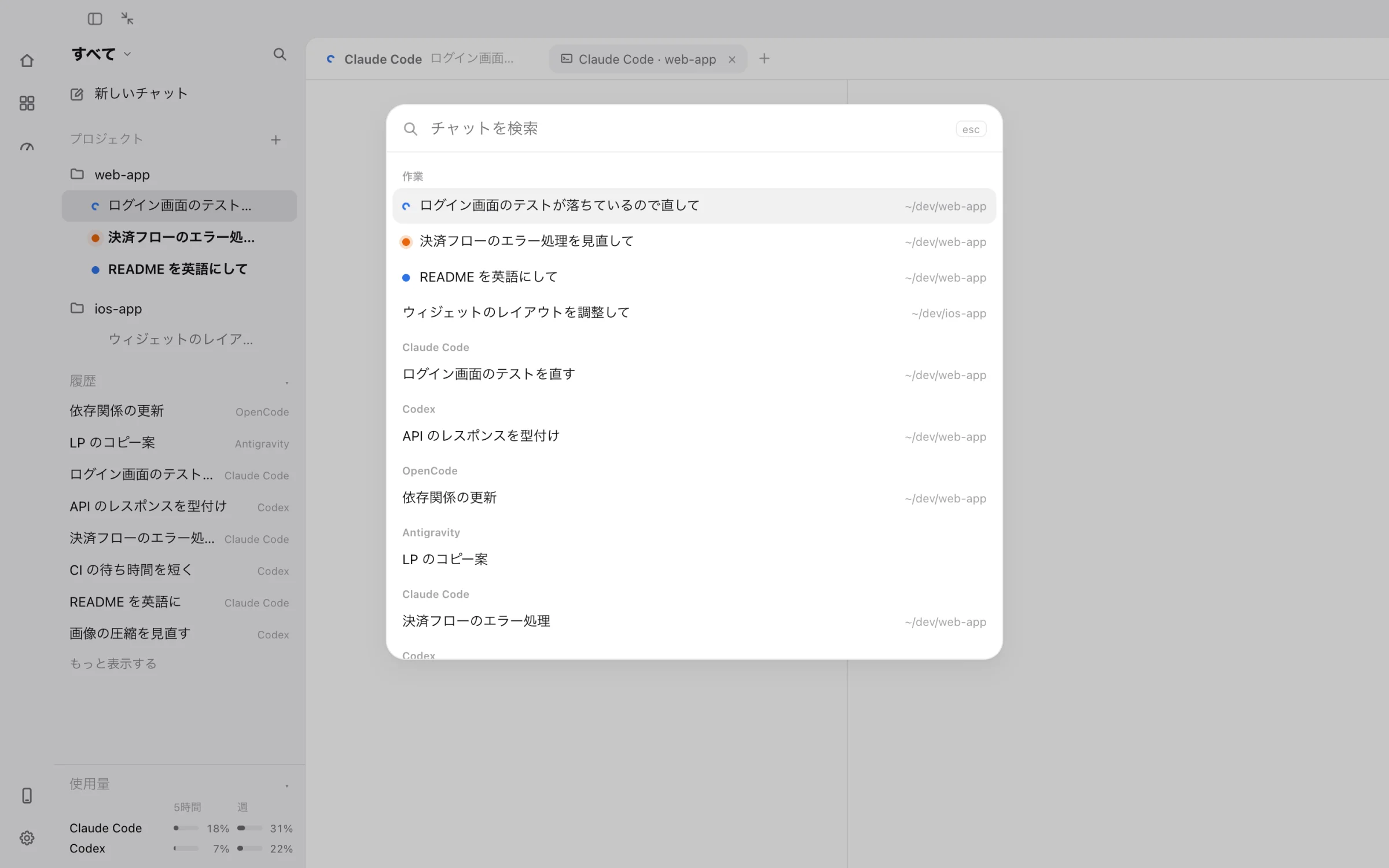
Search every conversation
Press ⌘K to find tasks and conversations across all agents by title or folder, and jump right in.
Tabs grouped by task
Each task keeps its own chats and terminals; switch tasks and the whole set comes back.
Pick the agent for each tab
Open a new tab with Claude Code, Codex, OpenCode and more.
Share MCP and skills
Copy connectors (MCP) and skills registered for one agent to the others.
Projects shared with iPhone
Your folders are the same list in the iPhone app, so you can pick up from either side.
Shortcuts and appearance
Do common things from the keyboard. Choose light or dark and how the input glows.
Usage at a glance
5-hour and weekly usage with reset times, in the sidebar and above the chat.
WHY BUDDYOS
Your PC's AI, free from your desk.
$ claude “fix & deploy”
✓ 34 tests passed
✓ deployed in 42s
Remote control
Securely operate PC agents from your phone.
Task completed
Claude Code — build #128 passed
Needs your approval
Codex — waiting on a permission
Real-time alerts
Instant push when tasks finish or error out.
09:41:02 agent.start claude
09:41:18 task.run build #128
09:42:04 task.done 46s
Logs & history
Every run logged — easy to search and review.
Security
Runs locally; your data stays in your environment.
+Extensible
Adding new agents is easy, and connectors (MCP) and skills can be shared between agents.
VOICE MODE
Just talk. Your AI, always around.
Talk to your agents like a phone call — give instructions hands-free on the move and hear the results back. It coexists naturally with calls and other audio, and keeps working in the background.
“Fix the tests and tell me when you're done.”
Get the PC app
Install BuddyOS on Mac or Windows and use it right on your PC. Pair your phone with a QR code to control it from anywhere.
Install the app
Install BuddyOS on Mac or Windows. It works on its own on your PC.
Pair with a QR code
Scan the QR code in the iPhone app. No VPN needed.
Use it from anywhere
Send instructions on the go and get a push notification when it's done.
macOS
Notarized by Apple — opens right away.
.dmg · Apple Silicon- macOS 15.6 or later
- Pair your phone with a QR code
- Updates are free too
Windows
SmartScreen: More info → Run anyway.
.exe · 64-bit- Windows 10 / 11
- Pair your phone with a QR code
- Code signing on the way
iPhone
Invites roll out to the waitlist via TestFlight.
TestFlight- Chat & voice control
- Push notifications for results
- Takes 30 seconds to join
Distributed via GitHub Releases.
FAQ
Questions, answered.
What is BuddyOS?+
BuddyOS is an "AI operating system" that runs multiple AI agents — Claude Code, Codex, OpenCode, Antigravity, Hermes and OpenClaw — on your Mac or Windows PC, and lets you control and monitor them from your iPhone. Without opening your laptop, you can run code, schedule tasks and check results from anywhere.
Can I control Claude Code from my iPhone?+
Yes. Launch the Bridge (a lightweight always-on app) on your Mac or Windows PC, pair it with the iPhone app via a QR code, and you can drive Claude Code from your phone — chat, skills, MCP, and model switching (Opus / Sonnet / Haiku) included.
Which AI agents are supported?+
Claude Code (Anthropic), Codex (OpenAI), OpenCode (SST), Antigravity (Google), Hermes (Nous Research), OpenClaw, Cursor CLI (Cursor) and Grok Build (xAI). BuddyOS is open by design, so more agents are added over time. You can switch freely between them in a single app.
Can I use it away from home?+
Yes. Once paired with a QR code, it connects through an encrypted relay server, so it works the same at home and on the go, with no VPN or Tailscale setup. It auto-follows network changes (your PC needs to be running).
How much does it cost?+
It's currently free to try via TestFlight, and the Bridge for Mac / Windows is a free download. Usage of the AI agents themselves (each provider's API or subscription) is billed separately.
Does it work on both Mac and Windows?+
Yes. The Bridge runs on Mac (Apple silicon, .dmg, macOS 15.6+) and Windows (64-bit, .exe, Windows 10/11). The phone side is an iPhone (iOS) app.
Is it secure? Where is my data stored?+
Agents run locally on your own PC, so your code and data stay in your environment. Your PC accepts no incoming connections; your phone reaches it through an encrypted relay server. Traffic is end-to-end encrypted, so the relay (run by a third party) can't read your conversations or API keys. You never have to hand your code to a third-party server.
Can I operate it by voice?+
Yes. BuddyOS supports voice conversations — just talk to your agent. It coexists naturally with calls and other audio, and keeps working in the background.
Can I schedule runs and get push notifications?+
Yes. Schedule tasks with cron and get push notifications on your phone when they finish or error out, so work moves forward while you sleep or commute.
What do I need to get started?+
A Mac or Windows PC and an iPhone. Install and launch the Bridge on your PC, scan the pairing QR with the iPhone app, and you're set up in minutes.